

Single Sign-On (SSO)
Integrate your authentication system with UniSignIn
Overview
UniSignIn SSO allows you to bridge your authentication system with the UniSignIn platform. This enables a seamless login experience — users authenticate once and gain access across both systems without being prompted to log in again.
UniSignIn SSO supports two integration modes:
| Mode | Use Case |
|---|---|
| Get SSO Token | Your application reads user identity from UniSignIn |
| SSO Login | Your application pushes user identity into UniSignIn |
Prerequisites
Before you begin, make sure you have:
- UniSignIn tag.js installed on your website (setup guide)
- An SSO Key Pair (
SSO_PUBLIC_KEYandSSO_PRIVATE_KEY) from your UniSignIn Dashboard
Never expose your SSO_PRIVATE_KEY in client-side code. It must only be used
on your server.
How It Works
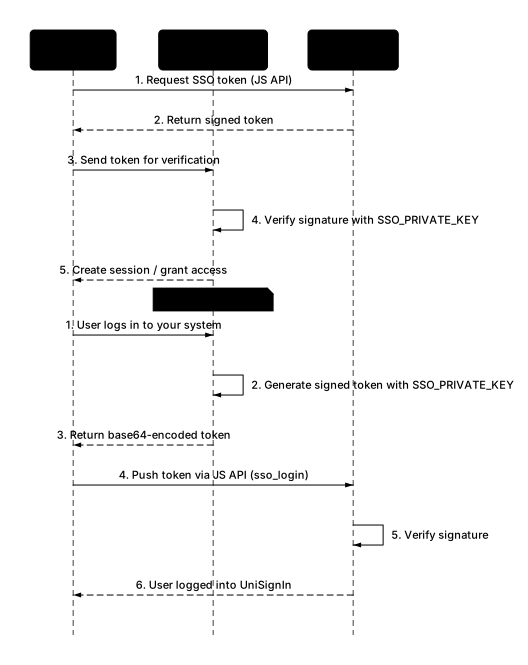 How It Works
Mode 1: Get SSO Token from UniSignIn
Use this mode when your application needs to identify users who have authenticated through UniSignIn.
 Mode 1: Get SSO Token
Step 1: Request the SSO Token
Call get_sso_token with your SSO_PUBLIC_KEY on the client side:
window.unisignin = window.unisignin || {}
window.unisignin.cmd = window.unisignin.cmd || []

window.unisignin.cmd.push([
  'get_sso_token',
  'SSO_PUBLIC_KEY',
  function (data) {
    if (data.status) {
      // Send the token to your server for verification
      fetch('/api/auth/sso', {
        method: 'POST',
        headers: { 'Content-Type': 'application/json' },
        body: JSON.stringify({ token: data.token }),
      })
    }
  },
])
Step 2: Decode the Token
The token is base64-encoded. Decode it to get the user data:
const userData = JSON.parse(atob(data.token))
The decoded token contains:
| Field | Type | Description |
|---|---|---|
email | string | Email of the authenticated user |
first_name | string | User's first name |
last_name | string | User's last name |
full_name | string | User's full name |
uid | number | UniSignIn user ID |
public_key | string | The SSO_PUBLIC_KEY used in the request |
signature | string | Signature for verification |
Example decoded token:
{
  "email": "[email protected]",
  "first_name": "Jane",
  "last_name": "Doe",
  "full_name": "Jane Doe",
  "uid": 12345676,
  "public_key": "SSO_PUBLIC_KEY",
  "signature": "a1b2c3d4e5..."
}
Step 3: Verify the Signature (Server-Side)
The signature is calculated as sha512(email + '-' + SSO_PRIVATE_KEY). You must verify it on your server to confirm the token is authentic.
Node.js
const crypto = require('crypto')

function verifySSOToken(token, privateKey) {
  const userData = JSON.parse(Buffer.from(token, 'base64').toString('utf8'))
  const expectedSignature = crypto
    .createHash('sha512')
    .update(userData.email + '-' + privateKey)
    .digest('hex')

  if (userData.signature !== expectedSignature) {
    throw new Error('Invalid SSO token signature')
  }

  return userData
}

// Usage
const user = verifySSOToken(req.body.token, process.env.SSO_PRIVATE_KEY)
PHP
function verifySSOToken($token, $privateKey) {
    $userData = json_decode(base64_decode($token), true);
    $expectedSignature = hash('sha512', $userData['email'] . '-' . $privateKey);

    if ($userData['signature'] !== $expectedSignature) {
        throw new Exception('Invalid SSO token signature');
    }

    return $userData;
}

// Usage
$user = verifySSOToken($_POST['token'], SSO_PRIVATE_KEY);
Python
import hashlib
import base64
import json

def verify_sso_token(token, private_key):
    user_data = json.loads(base64.b64decode(token).decode('utf-8'))
    expected_signature = hashlib.sha512(
        (user_data['email'] + '-' + private_key).encode('utf-8')
    ).hexdigest()

    if user_data['signature'] != expected_signature:
        raise ValueError('Invalid SSO token signature')

    return user_data
Mode 2: Login UniSignIn with Your SSO Token
Use this mode when users authenticate through your own system and you want to sync their identity to UniSignIn.
 Mode 2: SSO Login
Step 1: Generate the Token (Server-Side)
Build the token on your server and sign it with your SSO_PRIVATE_KEY. Each token includes the current time and is valid for 10 minutes, so create a new one each time you render a page.
To fill in the user's profile, add profile: a JSON object of their details, such as name, plan or company, sent as a string. Its keys are profile field names, see Profile Fields. The profile is part of the signature, so it can't be changed in the browser.
Node.js
const crypto = require('crypto')

function generateSSOToken(user, publicKey, privateKey) {
  const ts = Math.floor(Date.now() / 1000)
  const profile = JSON.stringify({
    first_name: user.firstName,
    last_name: user.lastName,
    full_name: user.fullName,
    plan: user.plan,
  })
  const profileHash = crypto.createHash('sha256').update(profile).digest('hex')
  const signature = crypto
    .createHash('sha512')
    .update(user.email + '-' + ts + '-' + profileHash + '-' + privateKey)
    .digest('hex')

  const token = {
    email: user.email,
    ts: ts,
    profile: profile,
    reg_date: user.createdAt,
    public_key: publicKey,
    signature: signature,
  }

  return Buffer.from(JSON.stringify(token)).toString('base64')
}
PHP
function generateSSOToken($user, $publicKey, $privateKey) {
    $ts = time();
    $profile = json_encode([
        'first_name' => $user['first_name'],
        'last_name' => $user['last_name'],
        'full_name' => $user['full_name'],
        'plan' => $user['plan'],
    ]);
    $signature = hash('sha512', $user['email'] . '-' . $ts . '-' . hash('sha256', $profile) . '-' . $privateKey);

    $token = [
        'email' => $user['email'],
        'ts' => $ts,
        'profile' => $profile,
        'reg_date' => $user['created_at'],
        'public_key' => $publicKey,
        'signature' => $signature,
    ];

    return base64_encode(json_encode($token));
}
Without a profile, leave out profile and sign email + '-' + ts + '-' + SSO_PRIVATE_KEY.
Step 2: Push the Token to UniSignIn (Client-Side)
Pass the base64-encoded token from your server to the client, then call the sso_login command:
window.unisignin.cmd.push([
  'sso_login',
  ssoToken, // base64-encoded token from your server
  function (result) {
    if (result.status) {
      // User is now logged into UniSignIn
      console.log('SSO login successful')
    } else {
      console.error('SSO login failed')
    }
  },
])
UniSignIn will verify the signature and return:
{ "status": 1 }
If the signature is invalid:
{ "status": 0 }
Step 3: Log Out (Client-Side)
When the user logs out of your application, log them out of UniSignIn too:
window.unisignin.cmd.push(['client_logout'])
Token Reference
Tokens You Send (Mode 2)
| Field | Required | Description |
|---|---|---|
email | Yes | User's email address. Users are matched by email |
ts | Yes | Current Unix time in seconds. The token is valid for 10 minutes |
profile | No | JSON object of profile fields, as a string. Values are text, numbers, true/false or null, up to 200 characters |
reg_date | No | When the user registered in your system. Used when UniSignIn first creates the user |
public_key | Yes | Your SSO_PUBLIC_KEY |
signature | Yes | See below |
The signature is a SHA-512 hex digest of:
- with a profile:
email + '-' + ts + '-' + sha256(profile) + '-' + SSO_PRIVATE_KEY, wheresha256(profile)is the SHA-256 hex digest of the exactprofilestring in the token - without a profile:
email + '-' + ts + '-' + SSO_PRIVATE_KEY
Each login updates the user's profile with the fields in profile. Fields you leave out keep their values.
Tokens From UniSignIn (Mode 1)
 Signature Algorithm
Tokens UniSignIn creates for you are signed with sha512(email + '-' + SSO_PRIVATE_KEY). Both parties share the SSO_PRIVATE_KEY, so you can compute the expected signature on your server to verify a token.
Security Best Practices
- Keep
SSO_PRIVATE_KEYsecret. Store it in environment variables or a secrets manager. Never include it in client-side code or commit it to version control. - Always verify server-side. Never trust a token without verifying the signature on your server.
- Create tokens when you need them. Tokens you send expire after 10 minutes, so don't store them or reuse them.
- Use HTTPS. All communication between your server, the browser, and UniSignIn must be over HTTPS to prevent token interception.
- Validate email format. Before processing the token, validate that the email field contains a well-formed address.
Stay ahead in first-party data
Identity, consent, audience, and subscription insights for publishers. A few emails a month, no spam.