

What Is a Metered Paywall? How It Works and How to Set the Meter
UniSignIn Team
4 min read


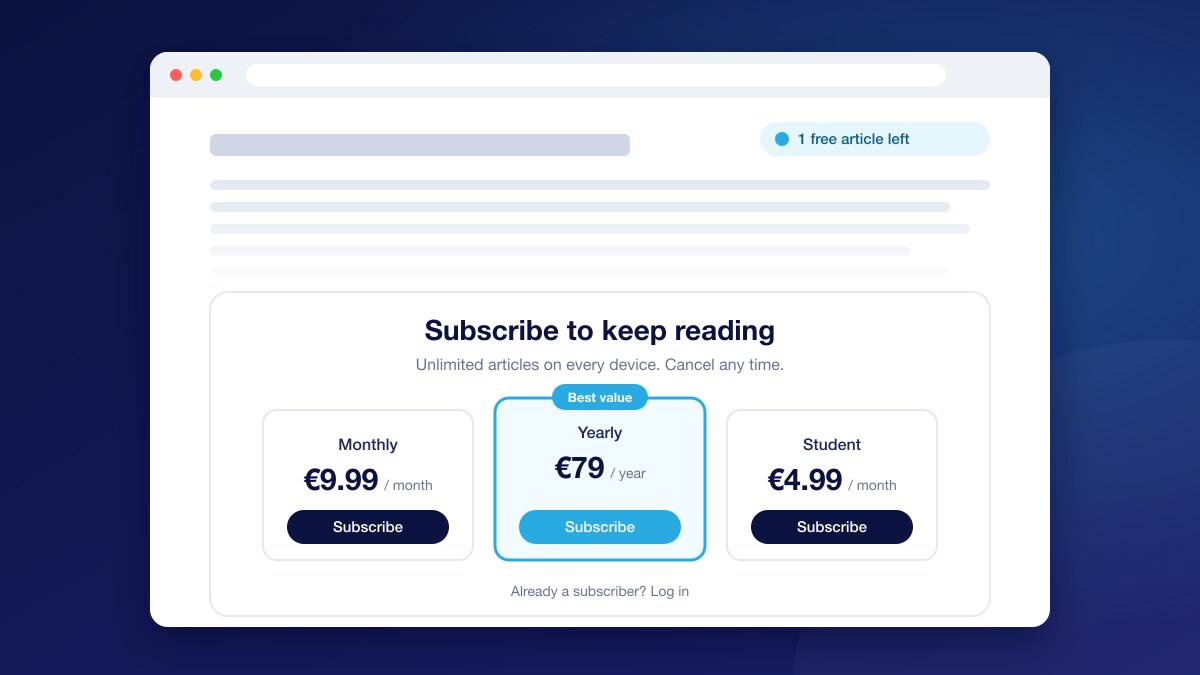

A metered paywall lets readers open a set number of articles for free each month, then asks them to subscribe to keep reading. It is the most common paywall model among news publishers because it balances two goals that pull in opposite directions: reaching as many readers as possible, and turning the most loyal of them into paying subscribers.
How a Metered Paywall Works
The publisher sets a meter: for example, five free articles a month. Each article a reader opens counts towards it. While the reader is under the limit, articles are free, and many publishers show a small banner such as "2 free articles left". When the reader reaches the limit, the next article is cut off and a panel offers subscription plans.
The meter resets at the start of each period, so occasional readers rarely hit it. The readers who do hit it are the ones who come back often, which makes them the most likely to pay.
Metered vs. Hard vs. Freemium Paywalls
| Model | What readers get free | Best for |
|---|---|---|
| Metered paywall | A number of articles per day, week or month | General news with a large casual audience |
| Hard paywall | Nothing beyond a preview | Specialist, financial or B2B publications |
| Freemium | Most articles; selected premium articles are locked | Publishers with a clear premium tier |
| Registration wall | Articles in exchange for a free account | Building a known audience before charging |
These models also combine well. A common setup is a registration wall first, a few extra free articles for readers who sign up, and a metered paywall after that.
How Many Free Articles to Give
There is no universal number, but the trade-off is clear:
- A low meter (one to three articles a month) converts more readers but reduces page views and ad revenue, and makes your site harder to share.
- A high meter (ten or more) keeps traffic and ad revenue high but leaves most readers with no reason to subscribe.
Start by looking at how many articles your readers open in a month. If 90% of readers open fewer than four articles, a meter of five will only ever reach your most loyal 10%, which is usually where you want to start. Lower it gradually while watching both subscriptions and page views.
You can also meter differently for different readers: a stricter meter for visitors arriving from search or social, who rarely return, and a looser one for loyal readers who already come back every week.
Show Readers the Meter
An articles left banner does more than inform. It reminds readers that they value your content before they hit the wall, and it makes the wall feel fair rather than sudden. Readers who see "1 free article left" are not surprised by the paywall on the next article.
Mistakes to Avoid
- Showing the paywall to subscribers. Paying readers who see a subscribe panel feel ignored. Make sure an active subscription always unlocks the article.
- Counting the same article twice. A reader who reopens an article they already read shouldn't lose another free article.
- A wall with no clear offer. Show plans and prices on the wall itself, with the best value highlighted, and let readers pay without leaving the article.
- Relying only on the browser. A meter kept in the browser starts again on a new device or after clearing cookies. For content that must not leak, keep the premium text on your server and send it only to readers who have access.
Measure Your Meter
Watch four numbers together: subscriptions started from the paywall, the share of readers who hit the meter, page views per reader, and ad revenue per reader. A change to the meter that lifts subscriptions but cuts page views sharply may cost more than it earns. Test changes on a share of readers first rather than switching everyone at once.
Set Up a Metered Paywall with UniSignIn
UniSignIn's paywall software includes a metered Access Wall: set the free articles per day, week or month, turn on the articles left banner, choose up to three plans and let readers subscribe in a checkout window without leaving the article. Each article counts once, subscribers never see the wall, and Protected Content keeps premium text off the page for readers who haven't paid.
For the steps, see Set up a paywall.
Everything you need
All-in-one platform
UniSignIn is all-in-one first-party data platform to collect and manage the first-party data of your digital assets.
- Social Login with Google Login
- Social Login with Facebook Login
- Social Login with Twitter Login
- First-party data analysis
- First-party data onboarding and management
- Single Sign-On with Email and password
- User experience orchestration engine
- Personalised Email and communication
- First-party data collector
- First-party tag management
Stay ahead in first-party data
Identity, consent, audience, and subscription insights for publishers. A few emails a month, no spam.